

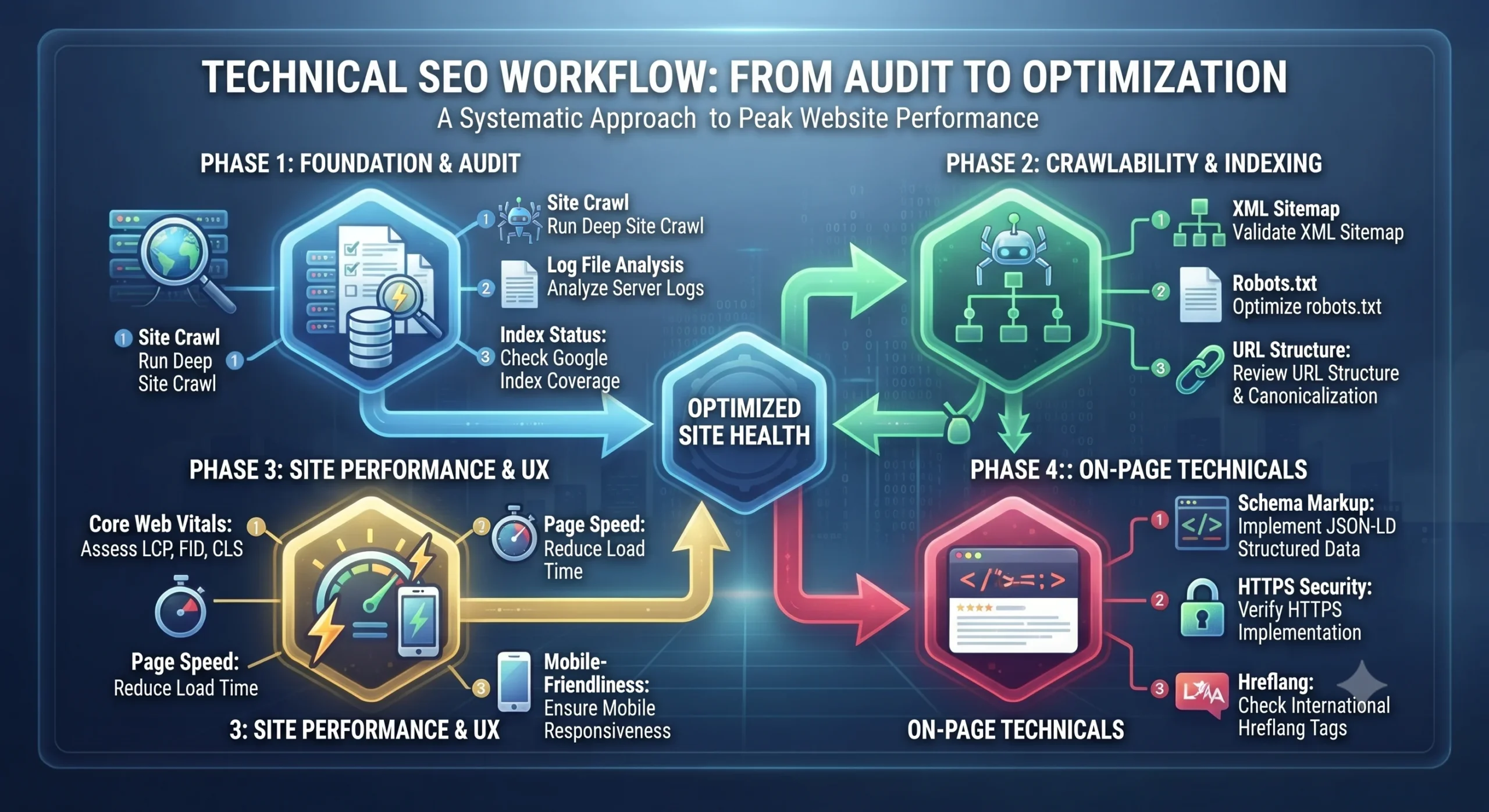
Everyone talks about keywords, content, and backlinks when discussing SEO. But here’s the truth: none of them matter if search engines can’t properly access, understand, and index your website. That’s where Technical SEO comes in.
Technical SEO is the foundation that powers every successful website. It ensures your site is fast, crawlable, mobile-friendly, secure, and structured in a way that helps search engines like Google discover and interpret your content efficiently. Whether you’re running a personal blog, an eCommerce store with thousands of products, or an enterprise website with millions of pages, a strong technical foundation can be the difference between ranking on the first page or remaining invisible.
In this guide, we’ll take a deep dive into Technical SEO, from how Google crawls, renders, and indexes your website to optimizing Core Web Vitals, site architecture, structured data, JavaScript SEO, crawl budget, and much more. Along the way, you’ll learn real-world implementation strategies, common technical pitfalls, and best practices used by SEO professionals to build websites that both users and search engines love.
By the end of this guide, you’ll understand not just what Technical SEO is, but why it matters and how to implement it effectively to improve your website’s search visibility, performance, and long-term organic growth.
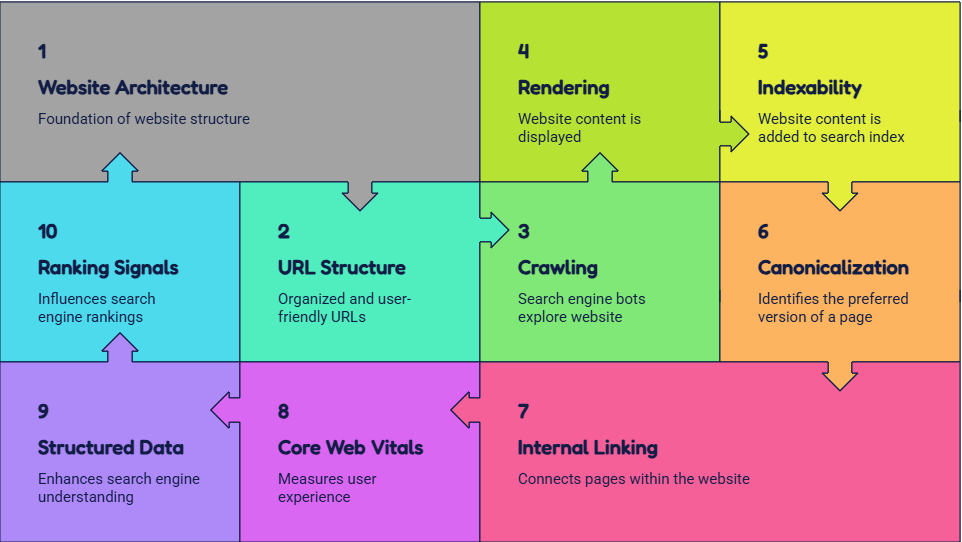
1. Website Architecture
What is it?
Website architecture defines the hierarchical organization of webpages and the relationships between them through internal linking. It determines how efficiently search engine crawlers discover, traverse, and interpret the importance of pages.
Google uses website architecture to understand:
1. Content hierarchy
2. Topical relationships
3. Page importance
4. Crawl paths
5. Link equity distribution
Technical Components
1. Flat architecture
2. Hierarchical structure
3. URL hierarchy
4. Breadcrumb navigation
5. Internal linking graph
6. Hub and spoke model
Optimization
1. Keep important pages within three clicks
2. Create logical parent-child relationships
3. Avoid orphan pages
4. Strengthen topic clusters
5. Maintain consistent navigation across templates
2. URL Structure
A URL is more than an address—it provides contextual signals to users and search engines.
Good URL : /technical-seo/xml-sitemap-guide
Bad URL : /page.php?id=234&cat=54
Technical Considerations
1. Human-readable
2. Static where possible
3. Lowercase
4. Hyphen-separated
5. Canonical-friendly
6. Avoid session IDs and unnecessary parameters
Google treats different URLs as separate resources unless canonicalized.
3. Crawlability
Crawlability determines whether search engine bots can access website resources.
Googlebot discovers URLs through:
1. Internal links
2. XML Sitemap
3. External backlinks
4. RSS
5. URL submissions
Technical Factors
1. robots.txt
2. Crawl directives
3. HTTP Status Codes
4. Internal linking
5. JavaScript rendering
6. Server response time
Poor crawlability directly reduces index coverage.
4. Crawl Budget
Every website receives a crawl budget.
It consists of: Crawl Rate Limit + Crawl Demand
Large websites often waste crawl budget on
1. Parameters
2. Duplicate pages
3. Faceted navigation
4. Infinite calendars
5. Search result pages
Optimization includes
1. Canonicalization
2. XML Sitemap optimization
3. Blocking unnecessary URLs
4. Removing redirect chains
5. Robots.txt
robots.txt is the first file Googlebot requests. It Controls crawler access.
robots.txt
CAN Prevent crawling
Example
User-agent: * Disallow:/admin/
Allow:
Sitemap:https://example.com/sitemap.xml
robots.txt
CANNOT
Prevent indexing if Google discovers URLs elsewhere.
6. XML Sitemap
An XML Sitemap provides a structured inventory of indexable URLs.
It helps Google prioritize crawling.
Each URL can include
1. Last modified
2. Priority
3. Change frequency
Technical Best Practices
1. Only canonical URLs
2. 200 Status pages
3. Under 50,000 URLs
4. Under 50 MB
5. Automatically updated
7. Indexability
Google evaluatesContent qualityDuplicate contentCanonical tagsNoindex directivesInternal authoritySpam signalsIndexability depends on technical and quality factors
8. Canonical Tags
Canonicalization solves duplicate content.
<link rel=”canonical”href=”https://example.com/page/” />
Google uses canonical as a hint, not a directive.
Technical Uses
1. URL parameters
2. Printer pages
3. Sorting
4. Product filters
5. Pagination alternatives
9. HTTP Status Codes
Status codes communicate server responses.
200 – Page available
301 – Permanent redirect
302 – Temporary redirect
304 – Not Modified
404 – Page missing
410 – Page permanently removed
500 – Server error
503 – Temporary maintenance
Incorrect status codes confuse search engines.
10. Redirect Management
Redirects preserve authority.
Best Practices
1. 301 for permanent moves
2. Avoid redirect chains
3. Avoid redirect loops
4. Update internal links
5. Remove obsolete redirects
11. Internal Linking
Internal links establish semantic relationships.
Benefits
1. Crawl discovery
2. PageRank distribution
3. Context
4. Topic authority
Technical Signals
1. Anchor text
2. Link depth
3. Navigation links
4. Contextual links
5. Footer links
12. Orphan Pages
Pages without internal links.
Problems
1. Google rarely discovers them
2. Little authority
3. Poor indexing
Detected using
1. Screaming Frog
2. Google Analytics
3. Google Search Console
13. Breadcrumb Navigation
Breadcrumbs communicate hierarchy.
Home > SEO > Technical SEO > XML Sitemap
Benefits
1. Better crawling
2. Schema support
3. Enhanced SERP
4. Navigation clarity
14. Mobile-First Indexing
Google indexes mobile versions first.
Requirements
1. Responsive design
2. Equal content
3. Same metadata
4. Fast loading
5. Accessible navigation
15. Core Web Vitals
User experience metrics.
LCP: Loading performance.
Target: <2.5 sec
INP: Responsiveness
Target: <200 ms
CLS: Visual stability.
Target: <0.1
Google measures these using Chrome User Experience Report data.
16. JavaScript SEO
Modern websites rely heavily on JavaScript.
Google performs
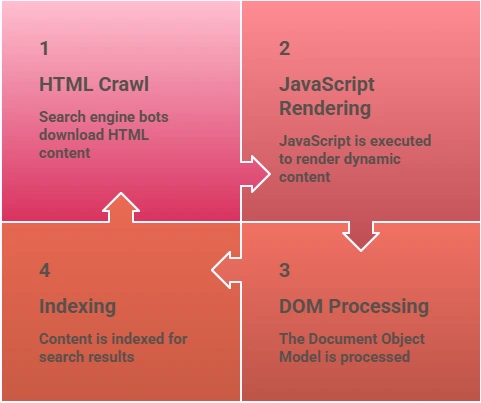
Problems
1. Client-side rendering
2. Delayed rendering
3. Blocked JS
4. Hydration issues
Solutions
1. SSR
2. SSG
3. Dynamic Rendering
17. Structured Data
Structured data uses Schema.org vocabulary.
Formats
1. JSON-LD
2. Microdata
3. RDFa
Common Schemas
1. Organization
2. FAQ
3. Product
4. Article
5. Breadcrumb
6. Service
7. Video
8. Event
9. Review
Benefits
1. Rich Results
2. Knowledge Graph
3. AI understanding
18. Duplicate Content
Occurs when multiple URLs share similar content.
Parameters
1. HTTP/HTTPS
2. WWW
3. Pagination
4. Printer pages
5. Sorting
Canonicalization resolves most issues.
19. HTTPS
Google uses HTTPS as a ranking signal.
Requirements
1. SSL
2. TLS
3. Mixed content removal
4. 301 redirect
5. HSTS
6. Secure cookies
20. Hreflang
International targeting.
Example:
hreflang=”en-us”
hreflang=”en-gb”
hreflang=”fr-fr”
Helps Google serve the correct language.
21. Faceted Navigation
Common in ecommerce. Creates millions of URLs.
Example:
Shoes > Brand > Color > Size > Price
Solutions
1. Canonical
2. Noindex
3. Parameter handling
4. robots.txt (carefully)
22. Pagination
Large datasets require pagination.
Google now recommends
1. Strong internal links
2. Self canonical
3. Load More carefully implemented
4. Infinite scroll with paginated URLs
23. Log File Analysis
Server logs reveal actual crawler behavior.
Analyze
1. Googlebot frequency
2. Status codes
3. Response times
4. Crawl waste
5. Priority pages
Enterprise SEO relies heavily on logs.
24. Image Optimization
Technical Factors
1. WebP or AVIF formats
2. Compression
3. Width and height attributes
4. Lazy loading
5. Descriptive filenames
6. Optimized alt text
7. Image XML sitemaps
8. CDN delivery
Proper image optimization improves LCP, crawl efficiency, and image search visibility.
25. Rendering
Google processes webpages in two phases:
1. Initial HTML fetch
2. JavaScript rendering through the Web Rendering Service (WRS)
If critical content is injected only after JavaScript execution, rendering delays can postpone indexing. Server-side rendering (SSR) or static site generation (SSG) ensures essential content is available immediately, improving crawl efficiency and indexability.
26. Page Experience
Beyond Core Web Vitals, Google evaluates the overall usability of a page, including:
1. Mobile friendliness
2. HTTPS security
3. Intrusive interstitials
4. Safe Browsing status
5. Accessibility of key content
A technically sound page that is also easy and safe to use provides a better experience, supporting stronger search performance.
Final Thoughts
Technical SEO isn’t a one-time checklist, it’s an ongoing process of ensuring your website remains accessible, efficient, and optimized for both users and search engines. As websites grow and search algorithms become more sophisticated, factors such as crawlability, indexability, site performance, structured data, and user experience play an increasingly important role in organic success.
A technically sound website provides the foundation upon which content, backlinks, and other SEO efforts can thrive. By continuously monitoring technical health, addressing issues proactively, and adapting to evolving search engine requirements, businesses can improve visibility, maximize organic traffic, and create a seamless experience for their audience.
Ultimately, great Technical SEO is about removing barriers between your content and search engines, making it easier for Google to discover, understand, and trust your website. When the technical foundation is strong, every other SEO investment becomes significantly more effective, helping your website achieve sustainable rankings and long-term growth.












Leave a Reply