

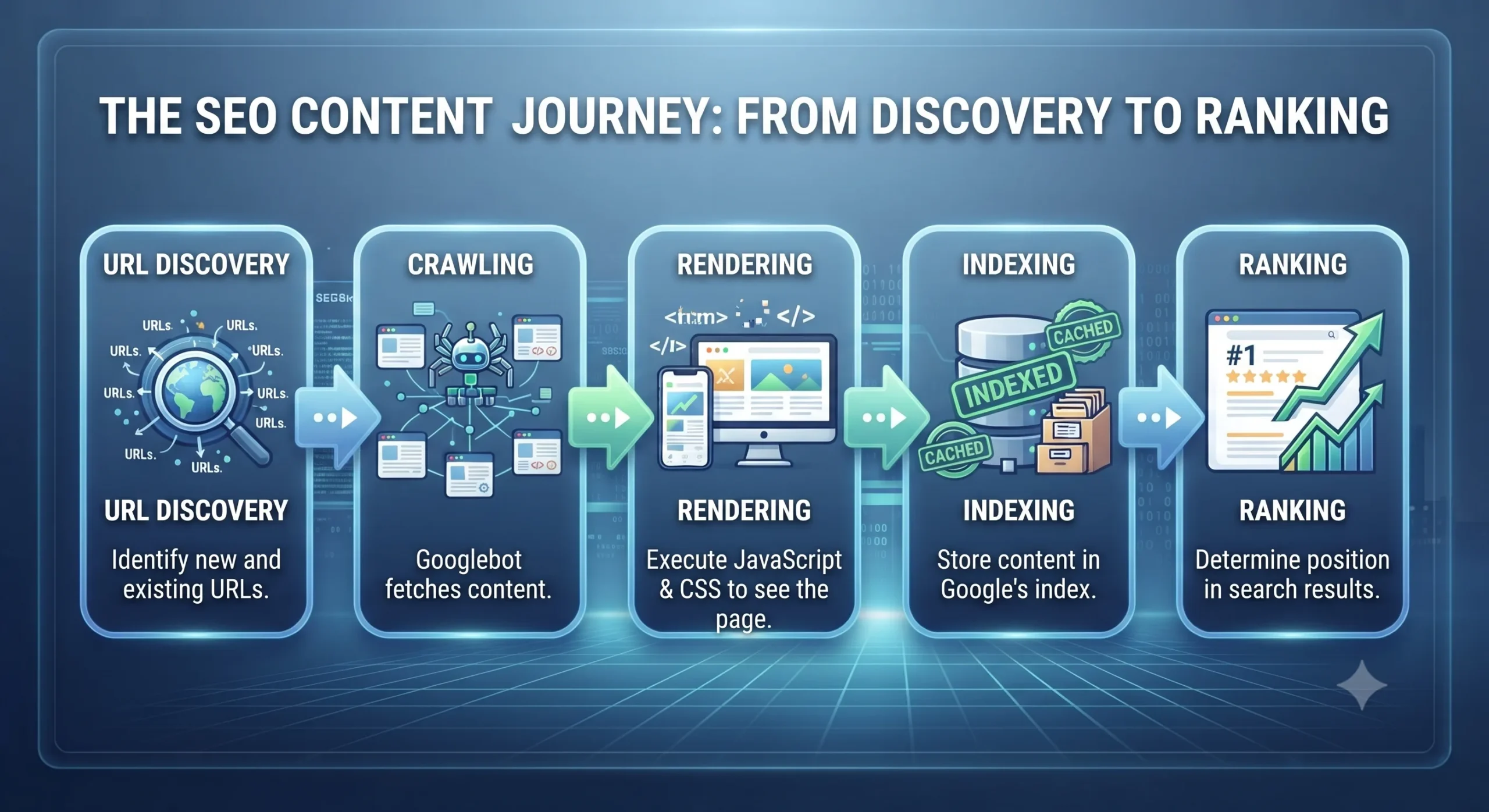
Discovering a page is only the beginning. Crawling allows Googlebot to fetch its content, but indexing is where the real decision happens.
Think of Google as the world’s largest digital library. Every day, billions of web pages compete for a place on its shelves. Just because a librarian picks up a new book doesn’t mean it will automatically be added to the library’s catalog. The librarian first checks whether the book is original, useful, complete, and worth keeping.
Google follows a very similar process. After crawling your webpage, Google’s systems analyze it to determine whether it should be stored in the Google Index. Only pages that make it into the index are eligible to appear in search results. If a page isn’t indexed, it doesn’t matter how well it’s optimized for keywords or how many backlinks it has—it simply cannot rank.
What Happens During Indexing?
Once Googlebot downloads your page, several automated systems begin evaluating it. These systems don’t just read the visible text, they examine the page’s entire structure and context.
Google looks at factors such as:
- The uniqueness and quality of the content
- Whether the page duplicates another page
- Canonical tags and preferred URLs
- Meta robots directives (index or noindex)
- HTTP status codes (200, 301, 404, etc.)
- Structured data and metadata
- Internal linking signals
- Mobile usability
- Page performance
- Spam and security signals
If the page passes these evaluations, Google stores it in the index, making it eligible to compete for rankings.
Why Crawled Doesn’t Always Mean Indexed?
One of the most common misconceptions among website owners is believing that once Google crawls a page, it will automatically appear in search results.
That’s not how Google’s indexing system works. Imagine launching 500 new blog posts on your website. Googlebot may discover and crawl all 500 pages within a few days. However, after evaluating them, Google might decide that only 350 provide enough value to include in its index.
The remaining pages may stay in a state known as “Crawled – Currently Not Indexed” or “Discovered – Currently Not Indexed.”
This doesn’t necessarily mean there’s a technical error. Instead, Google may have determined that those pages don’t offer sufficient value compared to other content already available on the web.
Key Takeaway
Crawling is Google discovering your page. Indexing is Google deciding whether that page deserves a permanent place in its search library.
Your goal isn’t to get every page indexed—it’s to ensure that every valuable page is discoverable, technically sound, unique, and useful enough that Google chooses to include it in its index. That decision is what ultimately makes ranking possible.
Common Reasons Pages Are Not Indexed
1. Duplicate Content
When multiple URLs contain nearly identical content, Google usually indexes only one version and ignores the others.
For example:
- /product/shoes
- /product/shoes?color=black
- /product/shoes?sort=price
Although these URLs are technically different, the core content remains the same. Without proper canonicalization, Google has to decide which version deserves indexing.
2. Thin or Low-Quality Content
Pages with very little useful information often fail to get indexed.
Examples include:
- Empty category pages
- Placeholder service pages
- Automatically generated pages with minimal value
- Product pages containing only manufacturer descriptions
Google aims to index pages that genuinely help users, not simply increase a website’s page count.
3. Noindex Directives
Sometimes, websites accidentally tell Google not to index important pages.
For example:

This tag explicitly instructs search engines to exclude the page from their index.
This is useful for pages such as:
- Login pages
- Admin dashboards
- Internal search results
- Thank-you pages
However, if this tag appears on a valuable landing page or blog post, that page will never rank.
4. Canonical Issues
Canonical tags help Google understand which version of a page should be considered the primary one.
If a page incorrectly points its canonical tag to another URL, Google may ignore it completely.
For example, imagine Product A mistakenly declares Product B as its canonical version. Google will likely index only Product B, even if Product A contains unique content.
5. Poor Internal Linking
Google relies heavily on internal links to understand the importance of pages.
A page with no internal links—often called an orphan page—may be difficult for Google to discover consistently and may receive little importance during indexing.
Strong internal linking not only improves crawlability but also signals that a page is valuable within your site’s overall structure.
6. Server and Technical Errors
Technical issues can prevent successful indexing, including:
- 5xx server errors
- Frequent downtime
- Slow response times
- Incorrect redirects
- Soft 404 pages
Even if Google wants to index a page, it cannot do so reliably if the server repeatedly fails to deliver it.
How to Check Whether a Page Is Indexed?
The easiest way to verify indexing is through Google Search Console.
Navigate to the URL Inspection tool and enter the page’s URL. Google will tell you:
- Whether the page is indexed
- When it was last crawled
- Which canonical URL was selected
- Whether the page is mobile-friendly
- Any indexing issues detected
Another quick method is using Google’s search operator:

If the page appears in the search results, it’s indexed. If it doesn’t, it may not be in Google’s index (though this method is less definitive than Search Console).
Best Practices for Better Indexing
Improving indexation isn’t about forcing Google to index every page. It’s about helping Google recognize which pages deserve to be indexed.
Some proven practices include:
- Publish original, high-quality content.
- Use self-referencing canonical tags where appropriate.
- Remove unnecessary noindex directives.
- Ensure important pages return a 200 OK
- Include valuable pages in your XML sitemap.
- Build a logical internal linking structure.
- Eliminate duplicate and near-duplicate content.
- Improve page speed and Core Web Vitals.
- Regularly monitor the Pages report in Google Search Console for indexing issues.
Real Business Scenario: Why Indexing Matters
A B2B software company launched 800 new product documentation pages to improve organic visibility. After several weeks, they noticed that only 520 pages were indexed.
An investigation revealed three key problems:
- Many pages contained nearly identical content with only minor wording differences.
- Important documentation pages were buried deep within the site’s navigation and had few internal links.
- Some pages mistakenly included a noindex meta tag inherited from a staging environment.
After rewriting thin content, strengthening internal links, removing the accidental noindex directives, and updating the XML sitemap, Google gradually indexed over 95% of the documentation pages within two months.
The result was a substantial increase in long-tail keyword rankings, higher organic traffic, and a measurable rise in product sign-ups from search.
Technical SEO Guide ↗













Leave a Reply